
DSLR Master Challenge
Fix blurry photos and videos using perfect camera settings.
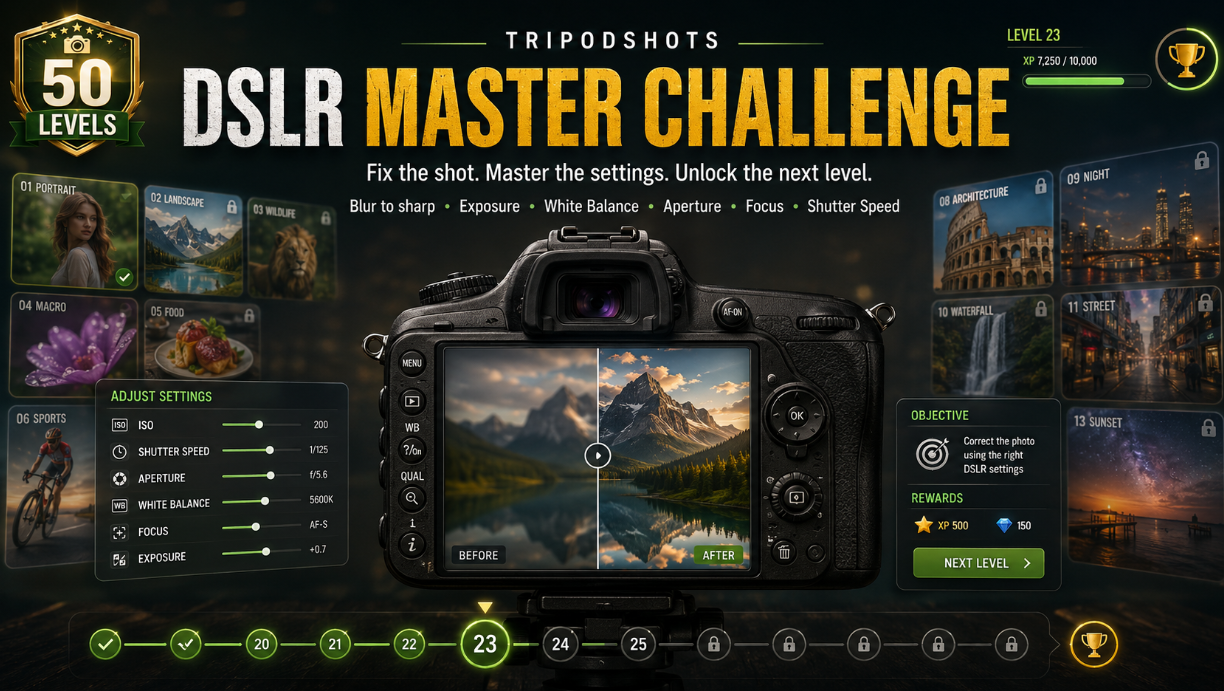
Do you want to learn camera settings in a fun and practical way? The DSLR Camera Settings Game by TripodShots is made for photography lovers, beginners, travellers, students, content creators, and anyone who wants to understand how a DSLR camera works.
Photography can look difficult at first. Basically Many beginners hear terms like ISO, shutter speed, aperture, white balance, exposure, focus, frame rate, RAW, JPEG, and manual mode, but they do not know how these settings affect a photo or video.
That is why we created the TripodShots DSLR Master Challenge.
This is not just a simple click-and-play game. It is a unique online photography game where you get a blurry, dark, bright, poorly focused, or badly balanced photo/video scene. Your job is to adjust DSLR-style settings and make the image look clear, sharp, and properly exposed.
If your settings are correct, you capture the perfect shot and move to the next level.
What Is the TripodShots DSLR Camera Settings Game?
The TripodShots DSLR Camera Settings Game is an interactive online game where players fix photography and video scenes using camera settings.
Each level gives you a different visual problem. The image may be too dark, too bright, blurry, noisy, too warm, too cool, overexposed, underexposed, or out of focus.
To clear the level, you need to adjust settings such as:
- ISO
- Shutter speed
- Aperture
- White balance
- Focus
- Camera mode
- Exposure compensation
Once the picture looks correct, you can click the capture button. If the settings are close to perfect, you unlock the next level.
As you move ahead, the levels become harder.
Why This Game Is Different From Other Online Photography Games
Most online games are only made for entertainment. They may be fun, but they do not always teach something useful.
This game is different.
The TripodShots DSLR Master Challenge is designed around real photography settings. It helps players understand how different camera controls affect the final image.
For example, if the photo is too dark, you may need to increase ISO, slow down the shutter speed, use a wider aperture, or adjust exposure compensation.
If the photo is blurry, you may need to improve focus or use a faster shutter speed.
If the colour looks too yellow or too blue, white balance may need correction.
This makes the game both fun and educational.
How to Play the DSLR Master Challenge
Playing the game is simple.
First, start the game from the game section. A photo or video-style scene will appear on your screen. The scene will not be perfect. It may have one or more camera problems.
Your goal is to check the image and adjust the available DSLR settings.
After changing the settings, look at the preview. If the image becomes clearer, sharper, and better exposed, you are moving in the right direction.
When you think the settings are perfect, click the capture button.
If your result is good, you will pass the level and move forward. If not, you can try again.
50 Levels of Photography Challenges
The game includes 50 levels, and each level becomes more challenging than the previous one.
At the beginning, the problems are simple. You may only need to fix brightness or focus.
Later, you may need to balance multiple settings together. For example, a night photo may need ISO adjustment, shutter speed control, aperture correction, and proper white balance.
This level-based structure makes the game more engaging because players keep learning step by step.
It also gives users a reason to come back and improve their score.
Photography Types Included in the Game
The DSLR Camera Settings Game includes many different photography styles, so players can experience different real-world shooting situations.
You may find levels based on:
- Portrait photography
- Landscape photography
- Wildlife photography
- Macro photography
- Street photography
- Night photography
- Astrophotography
- Product photography
- Food photography
- Sports photography
- Event photography
- Wedding photography
- Travel photography
- Architecture photography
- Fashion photography
- Candid photography
- Nature photography
- Cityscape photography
- Indoor photography
- Outdoor photography
- Pet photography
- Real estate photography
- Action photography
- Low light photography
- Festival photography
- HDR photography
- Panorama photography
- Close-up photography
Each photography type has a different setting challenge. This keeps the game fresh and interesting.
Learn ISO, Shutter Speed and Aperture While Playing
One of the most useful parts of this game is that it helps users understand the exposure triangle.
In photography, ISO, shutter speed, and aperture work together to control light.
ISO affects brightness and noise.
Shutter speed affects motion and blur.
Aperture affects brightness and depth of field.
Instead of only reading about these settings, you can test them inside the game. When you move the controls, you can see how the photo preview changes.
This makes learning easier for beginners.
White Balance and Focus Challenges
Many new photographers focus only on brightness. However, a good photo also needs correct colour and sharpness.
That is why this game also includes white balance and focus challenges.
If the image looks too warm, too cool, too yellow, or too blue, you may need to adjust the white balance.
If the subject is not sharp, you may need to correct the focus setting.
Some levels may require manual focus. And some may need auto focus. Also some may need face or eye detection style thinking.
These challenges help players understand that a perfect photo is not only about exposure. It is also about colour, sharpness, and subject clarity.
Why Beginners Should Play This Game
Many beginners buy a DSLR or mirrorless camera but continue using Auto Mode because manual settings feel confusing.
This game helps remove that fear.
It gives users a safe and fun way to experiment with DSLR settings. You can make mistakes, try different combinations, and learn how each setting changes the image.
There is no pressure. You do not waste real shots. And do not need an expensive camera. You can simply play and learn.
This makes the game useful for:
- Photography beginners
- Students
- Travel bloggers
- Content creators
- Nature photographers
- DSLR users
- Mobile photographers who want to learn camera basics
- Anyone planning to buy a camera
A Fun Way to Practise Manual Mode
Manual Mode can feel difficult at first because you control everything yourself.
But once you understand how ISO, shutter speed, aperture, white balance, and focus work together, photography becomes more creative.
The TripodShots DSLR Camera Settings Game gives you small practice situations where you can think like a real photographer.
For example:
A moving subject may need faster shutter speed.
A portrait may need a wider aperture for background blur.
A night scene may need higher ISO or slower shutter speed.
A landscape may need a smaller aperture for more depth.
A product photo may need clean focus and correct white balance.
This kind of thinking helps players understand photography in a practical way.
DSLR Settings Used in the Game
The game uses DSLR-style settings inspired by real camera controls.
These include:
- Auto Mode
- Program Mode
- Aperture Priority Mode
- Shutter Priority Mode
- Manual Mode
- Portrait Mode
- Landscape Mode
- Sports Mode
- Macro Mode
- Night Mode
- Food Mode
- HDR Mode
- Panorama Mode
- Movie Mode
- ISO
- Shutter Speed
- Aperture
- Exposure Compensation
- Metering Mode
- Auto Focus
- Manual Focus
- White Balance
- RAW/JPEG quality
- Noise Reduction
- Burst Mode
- Frame Rate
- Video Resolution
The game keeps the experience simple, but the concept is based on real camera learning.
Who Can Play This DSLR Camera Game?
This game is made for anyone who enjoys photography, travel, and creative learning.
You can play it if you are:
- A beginner photographer
- A travel lover
- A student learning camera basics
- A blogger
- A content creator
- A DSLR or mirrorless camera user
- A nature photographer
- A wildlife photography fan
- A wedding or event photography learner
- A casual user who enjoys online games
You do not need advanced photography knowledge to start. The game is designed to help you learn as you play.
Why This Game Is Good for TripodShots Users
TripodShots is focused on nature, photography, travelling, trekking, birds, flowers, landscapes, and outdoor experiences.
This DSLR game matches the same theme perfectly.
Instead of only reading blogs or viewing images, users can now interact with photography concepts directly. This makes the website more engaging and useful for visitors.
A user may come to read about travel or nature photography, then stay longer because they discover this interactive DSLR game.
That creates a better experience for photography and travel lovers.
Tips to Clear More Levels
To score better in the game, do not adjust settings randomly.
First, look at the image carefully.
Incase the image is too dark, think about ISO, shutter speed, aperture, or exposure compensation.
In other words if the image is too bright, reduce exposure or adjust the light-related settings.
Or If the subject is blurry, check focus and shutter speed.
If the image colour looks strange, change white balance.
If the background blur is too strong or too weak, check aperture.
The more carefully you observe, the better your result will be.
Start Playing the DSLR Master Challenge
Now it is time to test your photography skills.
Can you fix a blurry photo? Could you correct exposure? Can you adjust ISO, shutter speed, aperture, white balance, and focus like a real photographer?
Play the TripodShots DSLR Camera Settings Game and see how many levels you can complete.
Use the game below and start your DSLR learning challenge.
TripodShots DSLR Master Challenge
Fix the shot using ISO, shutter speed, aperture, white balance and focus. Clear all 50 levels!
Ready to Become a DSLR Master?
Play the TripodShots DSLR Master Challenge now and practise camera settings in a fun, interactive, and beginner-friendly way.
Fix the shot. Adjust the settings. Capture the perfect photo. Unlock the next level.
FAQ Section
What is the TripodShots DSLR Camera Settings Game?
The TripodShots DSLR Camera Settings Game is an online photography game where players fix blurry, dark, bright, or badly balanced photos using DSLR-style settings such as ISO, shutter speed, aperture, white balance, exposure, and focus.
Is this DSLR camera settings game free to play?
Yes, the game is free to play on the TripodShots website. Users do not need to download an app or create an account.
Can beginners play this photography game?
Yes, beginners can play this game. It is designed to help users understand camera settings in a simple and interactive way.
Does this game teach real DSLR settings?
The game is made for fun and learning. It uses DSLR-style settings such as ISO, shutter speed, aperture, focus, and white balance to help users understand how camera controls affect photos.
How many levels are in the game?
The game includes 50 levels. Each level has a different photography challenge, and the difficulty increases as the player progresses.
What photography types are included?
The game includes many photography styles such as portrait, landscape, wildlife, macro, street, night, astrophotography, product, food, sports, wedding, travel, architecture, fashion, nature, cityscape, and more.
Can I play this game on mobile?
Yes, the game is designed to work on desktop, tablet, and mobile devices.
Is this game useful for learning manual mode?
Yes, the game can help beginners understand manual mode by practising ISO, shutter speed, aperture, focus, and white balance in a simple game format.